
Skip to content
Blue Yeti USB Microphone
Mid-range

Best for

Podcasters and streamers looking for professional quality with USB connectivity

Blue Yeti USB Microphone

The Blue Yeti is one of the most popular USB microphones on the market. With multiple polar patterns and accessible onboard controls, it’s ideal for podcasters, streamers, and content creators working from home.

As an Amazon Associate, InHomeGear earns from qualifying purchases.

See price on Amazon(opens on Amazon, affiliate link)

Pros

  • ✓ Four pickup patterns — cardioid for one voice, bidirectional for a two-person interview across the desk, omni for a room, stereo for instruments. One mic doing jobs that normally take several
  • ✓ Gain, mute, pattern and headphone volume are all physical controls on the body, so nothing needs a software round trip mid-recording
  • ✓ Headphone jack on the mic itself for zero-latency monitoring — you hear yourself as recorded, not delayed
  • ✓ Blue VO!CE adds broadcast-style processing without a separate interface or plugin chain
  • ✓ Plug and play on Mac and PC, and it unscrews from the desk stand straight onto a boom arm
  • ✓ 4.6★ across 57,000 ratings — the most-reviewed product in our catalogue

Cons

  • – The 4–6 inch rule is the whole product. It looks like a desktop mic so people leave it a forearm away, and at that distance it stops recording you and starts recording your room — almost every complaint that the Yeti sounds bad traces back to this
  • – It is side-address, not top-address: you speak into the grille facing you, not into the top of the mic. Getting that wrong is the second most common mistake
  • – Very sensitive to reverb. In a room with hard walls and no soft furnishing it sounds boxy no matter how the gain is set
  • – The included stand passes desk knocks and keyboard strikes straight into the capsule — if you type while recording, a shock mount or boom arm stops being optional
  • – Tall and heavy enough to sit in the frame of a webcam shot, and the gain knob is unforgiving in both directions: too high clips, too low leaves the voice thin

The Blue Yeti is a proven choice for creators who want good audio quality without complications. Its USB connectivity makes it easy to use with any computer, and the multiple polar patterns give you flexibility for different recording scenarios.

Who it’s for

  • Podcasters recording solo or in face-to-face conversations
  • Streamers who need clear audio during long sessions
  • Content creators producing voice-over videos

The biggest mistake with the Blue Yeti is using the wrong pattern. For most home use:

  • Use the cardioid pattern for solo recording
  • Set the gain as low as possible to avoid picking up background noise
  • Speak from about 6–8 inches (15–20 cm) away from the microphone
  • Consider using a boom arm for better positioning

Blue Yeti USB Microphone

Podcasters and streamers looking for professional quality with USB connectivity

You might also like

More picks in this category.

DJI Mic Mini (2 TX + 1 RX + Charging Case)

Wireless lapel audio light enough to forget you clipped it on

The small DJI: two transmitters, a receiver and a charging case, at roughly half the weight and half the price of the full-size DJI Mic. Each transmitter clips on magnetically without dragging your collar down, runs 48 hours with the case, and cancels background noise on its own. Step up to the standard DJI Mic only if you need its far longer range.

Esinkin Wireless Audio Receiver (Bluetooth)

Adding Bluetooth to wired speakers and older audio gear

The Esinkin Wireless Audio Receiver adds Bluetooth to any speaker, amplifier, or receiver with an RCA or 3.5 mm input, so a wired setup you already like can stream straight from a phone or tablet. It ships with the AC adapter, USB power cable, and RCA-to-AUX cord needed to drop it into most systems, and pairing is a single button press. A cheap way to keep working gear in service instead of replacing it.

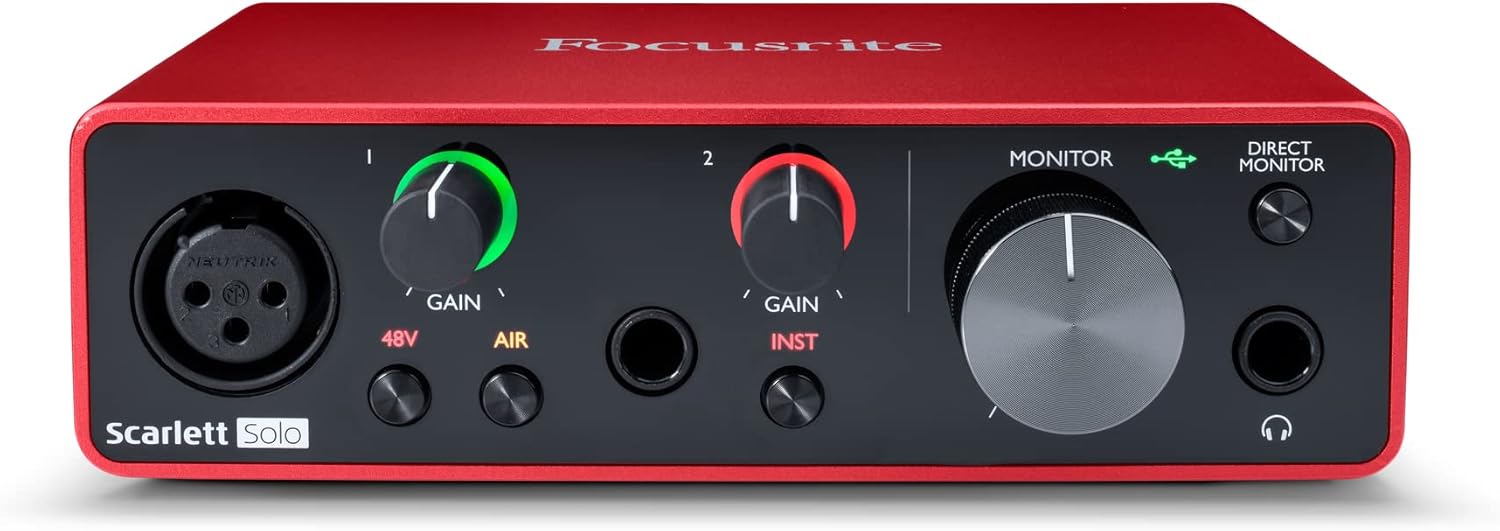
Focusrite Scarlett Solo 3rd Gen USB Audio Interface

The box an XLR mic needs before it will talk to your computer

An XLR microphone cannot plug into a laptop — it needs an interface to supply phantom power, add gain and convert the signal. The Scarlett Solo is the one most people start with: one XLR preamp with 56dB of gain and 48V, one instrument input for guitar, and 24-bit/192kHz conversion. Direct monitoring through the front headphone jack lets you hear yourself while recording with no delay.