Affiliate disclosure
As an Amazon Associate, InHomeGear earns from qualifying purchases. Clicking affiliate links may earn us a commission at no extra cost to you.The fastest way to sound better on a stream, a podcast or a video call is to upgrade your microphone — not your camera, not your lighting. Your mic. Audiences forgive a soft image long before they forgive straining to hear you.
If you’re starting out, a USB microphone is the right call. No audio interface, no phantom power, no extra cables. Plug it in and it works.
Here are the picks that hold up, and the setup mistakes that quietly ruin all of them.
Quick picks
| What you need | Best beginner microphone |
|---|---|
| Everything in one box, cheapest | MAONO DGM20S |
| Budget, with an upgrade path | FIFINE AM8 |
| One mic to grow into | Blue Yeti |
| Streaming, on camera | HyperX QuadCast 2 |
| Recording away from a desk | Mini Mic Pro |
What to look for
USB vs XLR
For beginners, USB is the right choice. It appears as an audio device the moment you plug it in — no interface, no phantom power supply, no extra purchases.
XLR gives more control and a longer upgrade path, but needs a separate audio interface plus cables and configuration. Start USB, move to XLR when you outgrow it. If you’re already weighing it up, read the full USB vs XLR breakdown.
Pickup pattern
Most desktop USB mics use a cardioid pattern, which takes sound from the front and rejects what’s behind it. That is what you want — it handles keyboard noise and room echo far better than an omnidirectional pattern.
Condenser or dynamic
Condensers hear more detail, and more of your room. Dynamics hear less of both. In an untreated bedroom or apartment, a dynamic mic usually sounds better than a condenser twice its price, simply because it ignores the walls.
Physical design
A side-address mic — you speak into the side, not the top — is more natural at desk distance. Top-address mics need more precise positioning to sound right.
The best beginner microphones
MAONO DGM20S — everything in one box
Most microphones arrive with a small desk stand, and the boom arm is a second purchase that often costs as much again. This one includes the arm, a shock mount and a pop filter, which means the mic gets up off the desk and away from your keyboard on day one.
That matters more than the spec sheet suggests. Two of the four mistakes further down this page — bad positioning and plosives — are solved by hardware this kit already ships with.
Gain, tap-to-mute and a headphone jack for monitoring all sit on the mic itself. Worth knowing: the tap-to-mute is the weak point, and often wants a second, firmer press.
Best for: the cheapest route to a complete, properly mounted setup.

MAONO DGM20S USB Microphone with Boom Arm
Best all-in-one kitMost streaming mics arrive with a small desk stand, and the boom arm is a second purchase that often costs as much again. The DGM20S includes the arm, a shock mount and a pop filter in the box, so the mic gets up off the desk and away from keyboard noise on day one. Gain, tap-to-mute and a headphone jack for monitoring all sit on the mic itself, and it connects over USB-A or USB-C.
FIFINE AM8 — budget with an upgrade path
A dynamic USB/XLR mic that punches above its price. It carries both outputs, so you can start on USB today and move to an audio interface later without buying another microphone.
Being dynamic, it forgives an untreated room in a way entry-level condensers do not. If your space echoes, this is a smarter starting point than most mics at the price.
Best for: beginners who suspect they’ll go XLR eventually and don’t want to buy twice.

FIFINE AM8 USB/XLR Dynamic Microphone
Best budget pickA versatile dynamic microphone with both USB and XLR connectivity, delivering clear audio for streaming, podcasting, and content creation. Includes built-in controls, headphone monitoring, and RGB lighting for modern setups.
Blue Yeti — the one to grow into
The most popular beginner USB mic for years, and the reasons hold. Four pickup patterns (cardioid, omni, stereo, bidirectional), a headphone jack for zero-latency monitoring, and sound that needs no EQ out of the box.
The catch is size. The Yeti is large and claims real desk space. If your desk is already tight, that footprint is a genuine consideration.
Best for: anyone who wants versatility and a product so well documented that every setup question has already been answered somewhere.

Blue Yeti USB Microphone
Best all-around USB micThe Blue Yeti is one of the most popular USB microphones on the market. With multiple polar patterns and accessible onboard controls, it’s ideal for podcasters, streamers, and content creators working from home.
HyperX QuadCast 2 — for streaming on camera
Built for streaming specifically. An anti-vibration shock mount means keyboard noise barely registers, the tap-to-mute sensor has an LED so you always know your status, and it looks the part in frame.
Best for: streamers who want a mic that sounds professional and reads as professional on camera.
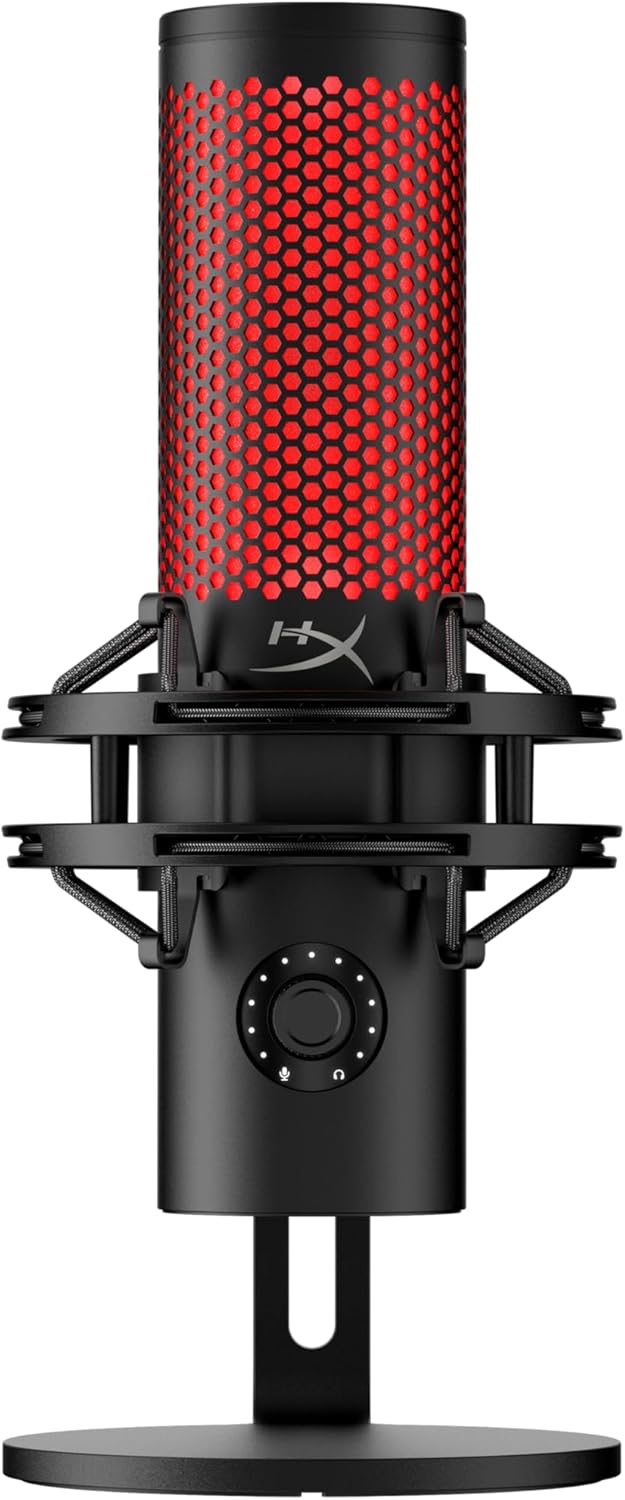
HyperX QuadCast 2 USB Microphone
Best for streamersA popular USB microphone designed for streamers, gamers, and podcasters. The HyperX QuadCast 2 delivers clear audio, built-in controls, and signature RGB lighting with a shock mount included.
Mini Mic Pro — recording away from the desk
Every mic above assumes you’re sitting at a desk. If you’re recording to camera — walking, filming outdoors, interviewing someone — none of them help.
This is a two-pack of wireless lapel mics: clip the transmitter on, plug the receiver into a phone, record. The audio is not studio grade, but against a phone’s built-in microphone it is not close.
Best for: a first recording mic for TikTok, Reels and vlogs, where portability beats fidelity.

Mini Mic Pro Wireless Lavalier Microphone (2-Pack)
Best for recording on the moveGet clean, wireless audio instantly with this compact lavalier microphone set. Perfect for TikTok, YouTube, interviews, and mobile content creation—just plug it in and start recording with professional-sounding audio.
Common beginner mistakes
Buying XLR without an interface. XLR mics do not work without one. Factor that cost in before comparing prices.
Wrong positioning. Most mics want to sit 6–12 inches from your mouth, slightly off-axis. Pointed straight at you, they catch every plosive — the popping “p” and “b” sounds. A boom arm fixes the distance and a pop filter fixes the rest.
Ignoring the room. A great mic in a bare, reflective room still sounds hollow. A rug, a bookshelf or a blanket behind you kills more echo than most people expect — and costs nothing.
Using omni or stereo on a noisy setup. Stick to cardioid unless you have a specific reason not to. Omnidirectional picks up everything: your keyboard, the air conditioning, the street.
What should you actually buy?
- Cheapest complete setup: MAONO DGM20S — mic, arm, shock mount and pop filter together
- Budget with an upgrade path: FIFINE AM8 — USB now, XLR later
- Best all-rounder: Blue Yeti — versatile, documented, solid
- For streamers: HyperX QuadCast 2 — tap-to-mute, shock mount, on-camera presence
- For recording on the move: Mini Mic Pro — wireless, clips on, works with a phone
For most beginners, start with the Blue Yeti. It is versatile enough to grow with you and documented enough that any question you hit has been answered already.
If money is the constraint, the MAONO gets you a mounted, filtered setup for less than a bare mic elsewhere — and mounting is what most beginners get wrong.
Blue Yeti USB Microphone
Four pickup patterns, zero-latency headphone monitoring, plug-and-play USB. The most versatile starting point for streaming, podcasting and content creation.
Browse all creator gear picks →