
Affiliate disclosure
As an Amazon Associate, InHomeGear earns from qualifying purchases. Clicking affiliate links may earn us a commission at no extra cost to you.Desk audio looks like one category and behaves like two. Speakers are bought on what you hear. Headsets are bought — or should be — on what everyone else hears.
That second job is the one a home office actually depends on, and it’s the one the specs are quietest about. Nobody lists a microphone measurement. So we read the review data instead, and across twelve listings it says the same thing with unusual consistency: the microphone is where inexpensive audio fails. It’s also the part a headset exists for.
Here’s how that plays out, and which of these twelve is worth your desk.
The short answer
For a desk that plays sound out loud, the Edifier G2000 is the pick: real stereo separation, 16W RMS, three inputs, and cabinets angled up 10° so the drivers point at your head rather than your chest.
For calls, the answer is a headset, and the honest one is the Razer BlackShark V2 X — over-ear at 240g, no battery, no pairing. The best-selling option is the Logitech H390 at $21, with a durability record you should read before buying.
Quick comparison
| Product | Job | Type | Best for | Price |
|---|---|---|---|---|
| Edifier G2000 | Listening | Speakers | The desk pick — stereo with headroom | Mid |
| Edifier M60 | Listening | Speakers | When the speakers are the point | Premium |
| Creative Pebble V3 | Listening | Speakers | One USB-C cable, drivers aimed up | Budget |
| Amazon Basics | Listening | Speakers | Cheapest real stereo, fits under a monitor | Budget |
| Logitech Z207 | Listening | Speakers | A headphone jack you can reach | Budget |
| Cyber Acoustics CA-2890BT | Both | Mono bar | Calls out loud, zero desk space | Budget |
| Logitech H390 | Calls | Headset | The default, at $21 | Budget |
| JIAMQISHI | Calls | Headset | Separate speaker mute, live indicator | Budget |
| Razer BlackShark V2 X | Calls | Headset | All-day wear, over-ear, no battery | Budget |
| Ozeino OW810 | Calls | Headset | The only wireless one here | Budget |
| Skullcandy Crusher ANC 2 | Listening | Headphones | Adjustable bass, 60h battery | Premium |
| Raycon Everyday | Both | Earbuds | Pocketable ANC for calls and commuting | Mid |
Speakers or a headset?
The fork is simpler than the shelf makes it look.
Buy speakers if your calls are occasional, you’re alone in the room, and most of your listening is music or background while you work. Speakers are more pleasant, they don’t sit on your head for eight hours, and they don’t need charging.
Buy a headset if you’re on calls back to back. Two reasons, and the second one is the one people miss. Speakers let the room into your microphone — keyboard, fan, family, the call itself echoing back. And a headset’s boom mic sits two inches from your mouth rather than eighteen inches away on the desk, which does more for how you sound than any amount of noise-cancelling software.
Buy both if you can. They’re cheap enough at this end that a $25 speaker pair and a $21 headset together cost less than one nice pair of headphones, and each does its own job properly.
The one product here that tries to be both is the Cyber Acoustics bar — a speakerphone that clamps under the monitor. It’s a real answer for a desk with no space, with one caveat covered below.
What matters
The microphone is where cheap audio fails
This is the finding, and it’s consistent enough across separate listings to be a pattern rather than three unlucky products:
- JIAMQISHI — 104 of 242 microphone mentions negative, and the complaint that repeats is that it cuts out mid-call. On a headset whose entire reason to exist is its boom mic.
- Razer BlackShark V2 X — 167 of 425 microphone mentions negative, plus a separate “microphone reliability” theme at 105 of 266.
- Logitech H390 — 590 of 1,567 mentions on its noise-cancelling feature are negative.
Read that together and the conclusion is uncomfortable but useful: at this price the microphone is the component most likely to disappoint, on products bought specifically for the microphone. It doesn’t mean don’t buy one — the H390 has 74,270 ratings for a reason. It means test yours in the first week, while you can still return it, rather than discovering it on a call that mattered.
How to test it in two minutes: record a voice memo at your normal seating distance, then play it back. Record a second one with a colleague on a real call and ask them, because the failure mode described in these reviews isn’t thin sound — it’s the mic dropping out, which you cannot hear from your side.
Reliability inverts at the budget end of speakers
Every desktop speaker pair here rates 4.4★ or better. Look under the average and reliability is the theme where several of them turn:
- Creative Pebble V3 — 115 of 167 reliability mentions negative, and the recurring account is a pair that worked for roughly a year and then stopped
- Amazon Basics — 564 of 1,777 negative, most describing one channel going silent
- Logitech Z207 — 98 negative against 96 positive, a coin flip, with some describing outright failure
- Edifier M60 — Bluetooth is the headline feature and the recurring complaint: 31 of 77 mentions negative, describing dropouts rather than pairing trouble
The Edifier G2000 is the one pair on this page without that pattern in its review base, which is a substantial part of why it’s the pick.
The listings contradict themselves — check before you buy
An unusual number of these products disagree with their own spec sheets. All of these are on the live listings:
- Logitech H390 — Amazon’s spec table calls it “On Ear” in one row and “Over Ear” in the next. Given that fit runs 766 negative of 1,222 mentions, that’s the single question worth settling first.
- Cyber Acoustics — the bullets claim 5W output, the spec table says 10 watts maximum.
- Razer BlackShark V2 X — Amazon lists Bluetooth under Wireless Technology. There is none; it’s 3.5mm wired only.
- Ozeino OW810 — no battery life figure appears anywhere on the listing, which on a wireless headset is the number that decides whether it lasts a working day.
- JIAMQISHI — the listing copy credits “Eaglend” for the design, the sound lab and the warranty, while the brand, manufacturer and seller are all JIAMQISHI. Rebadging is ordinary at this price; it matters when a warranty claim needs an owner.
Mono is a real trade, not a technicality
The Cyber Acoustics bar is mono. Amazon’s spec table states it plainly, and it’s the thing to settle before anything else about it.
Every other speaker here is a stereo pair. One bar cannot place sound left and right, however good it sounds — and stereo separation is most of what makes desk speakers better than the ones already inside your monitor. If the bar’s zero-footprint mounting is what you need, that’s a fair trade. Just make it knowingly.
Review counts aren’t always what they look like
Ozeino’s 13,398 ratings belong to a parent listing shared by five colour variants — black, blue, red, pink and black-and-white. Amazon pools reviews across a colour family, so read that number as covering the model rather than the specific unit you’ll receive.
Worth knowing generally: matching rating counts across two listings usually means the same product in two colours, not two independent verdicts.
Headsets, for being heard
Razer BlackShark V2 X — best for all-day calls
The headset that solves comfort at the source. Closed over-ear cups enclose the ear instead of pressing on it, and at 240g there’s little weight fighting that seal across a long day — which is the difference between a headset you wear for an hour and one you forget you have on. Wired 3.5mm, so there’s no battery to watch and nothing to pair.
Key features:
- Closed over-ear at 240g — isolation from the seal, light enough to survive a full day
- Triforce 50mm drivers split into three sections tuned separately for highs, mids and lows
- Cardioid HyperClear mic that narrows on your voice and rejects what comes from behind and the sides
- One 3.5mm plug: PC, Mac, PS5 and Switch all work without a dongle, splitter included
- Two-year warranty, 4.4★ across 19,176 ratings
Worth knowing: durability is the one theme where complaints outnumber praise (114 negative to 86 positive), and the accounts describe it breaking rather than wearing out. The microphone carries the pattern described above. The 7.1 surround is software and Windows-only by Razer’s own asterisk — on a Mac or console this is a stereo headset. Noise runs 79 negative of 130 mentions with “staticky” recurring, and with no sound card of its own it’s at the mercy of whatever analogue jack it meets.
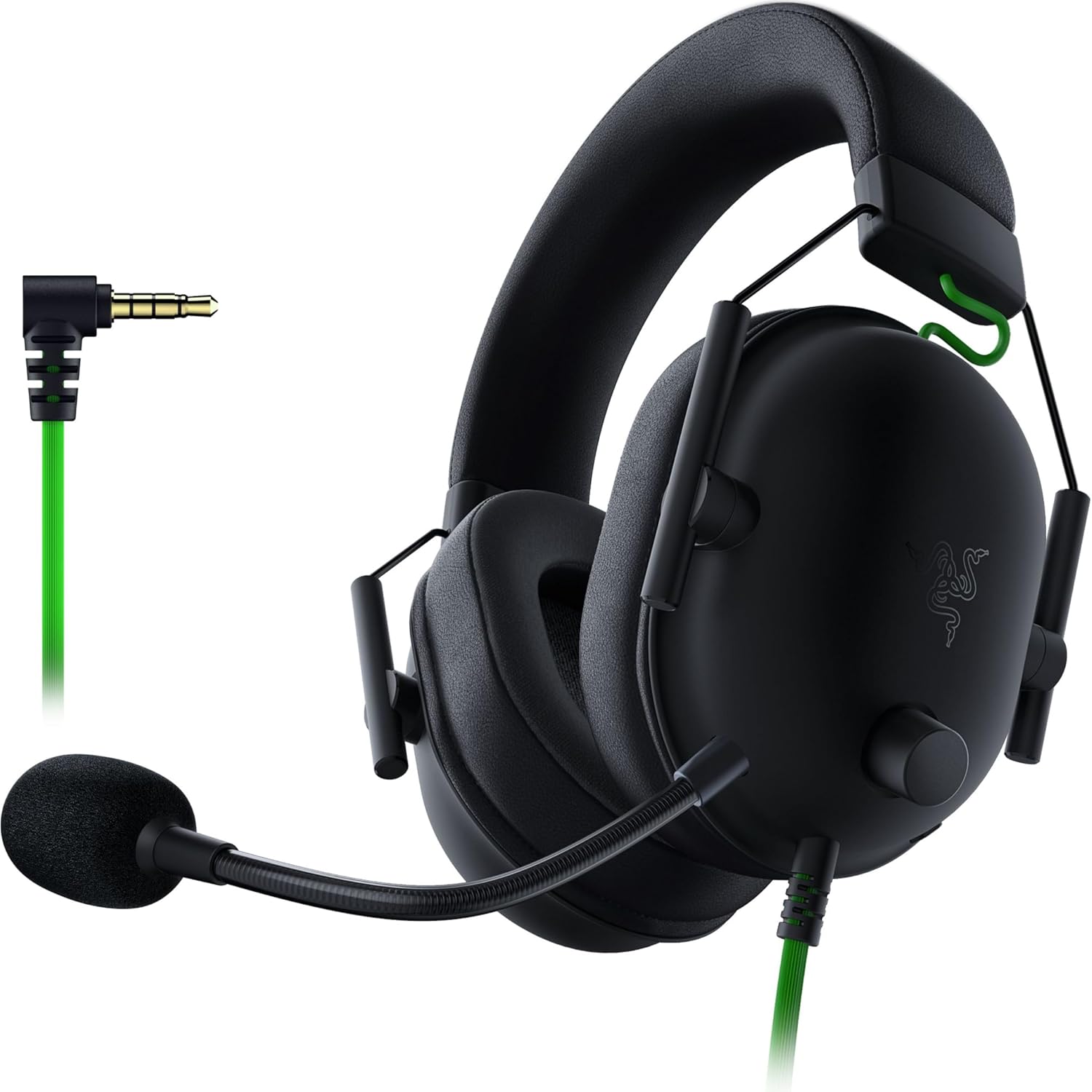
Razer BlackShark V2 X Gaming Headset
Best for callsA closed over-ear headset that leans on the seal rather than on electronics: the cups enclose the ear, and at 240g there is little weight fighting that seal over a long day. The 50mm drivers are split into three sections tuned separately for highs, mids and lows, and the mic is cardioid, narrowing on your voice and tapering off toward the back and sides. Wired 3.5mm only, so there is no battery, no pairing, and a laptop and a console both work as-is.
Logitech H390 — the default, and the one to check the fit on
Number one in Amazon’s Computer Headsets across 74,270 ratings, which is several times the evidence base behind anything else here. Plug-and-play USB-A with nothing to install — which is exactly why it works on a locked-down work laptop as readily as a personal one. Sound quality runs 3,542 positive to 662 negative at $21, which is remarkably one-sided.
Worth knowing, and this is the important part: durability runs 1,115 negative against 552 positive across 1,667 mentions — twice as many owners report these breaking as report them lasting. Fit runs 766 negative of 1,222, and comfort splits almost dead even at 1,807 to 1,683, with clamping pressure the recurring account. And Amazon’s own spec table can’t decide whether it’s on-ear or over-ear.
Buy it as the cheapest way to be heard clearly, understand it’s a consumable at this price, and if the fit numbers give you pause, the BlackShark above is over-ear for about $19 more.

Logitech H390 USB Headset
Best sellerThe headset that outsells everything else in its category, and it is not complicated: a USB-A plug, a rotating noise-cancelling boom that tucks up out of the way when the call ends, and volume and mute on an in-line pod. No drivers and no software, so it behaves the same on a locked-down work laptop as on a personal one. The 74,270 ratings are the reason to consider it — and what they disagree about is the reason to read on, because it is not the sound, it is the headband.
JIAMQISHI — separate speaker mute and a live indicator
Built for meetings rather than listening. A unidirectional boom that rotates through 270° so it works on either ear, a built-in USB sound card that routes around the computer’s own audio hardware, and an in-line pod that separates volume, mic mute and speaker mute — with a light that stays lit while the headset is live, so muted-and-talking is visible rather than guessed.
Worth knowing: the microphone is the weakest part of a product built around its microphone — 104 of 242 mentions negative, describing it cutting out mid-call. Fit divides almost exactly in half, nearly all saying too tight; these are on-ear, so the pads press on the ear rather than enclosing it. At 4.2★ it’s the lowest rating in this subcategory, and it’s spread across comfort, reliability and noise cancellation rather than concentrated in one fixable flaw.
The H390 does the same job for about $6 less with a far larger review base. What this keeps is the separate speaker mute and the live-indicator light.

JIAMQISHI USB Headset with Boom Microphone
Back-to-back calls, where being heard matters more than what you hearA wired on-ear headset built for meetings rather than for listening. The boom mic is unidirectional and swings through 270°, so the same unit works on either ear, and a built-in USB sound card means the computer's own audio hardware never enters the signal path. The in-line pod carries volume, mic mute and speaker mute as separate controls, with a light that stays lit while the headset is live. Sold in a USB plus 3.5mm configuration, so it reaches a desktop or a phone without an adapter.
Ozeino OW810 — the only wireless one
Everything else here is tethered. This runs on a 2.4GHz dongle supplied in both USB-A and USB-C, with claimed latency under 30ms, plus Bluetooth as a second mode for phones. The mic flips up to mute, which is faster and more certain than finding a button mid-sentence. A three-year warranty at $40 is unusual.
Worth knowing: compatibility is the weak theme at 126 negative of 330 mentions, mostly saying it won’t connect to a PS5 — and the listing explains why in its own fine print: only the dongle talks to a PS5, PS4 or PC, while Bluetooth mode needs a separate adapter that isn’t included. Use the dongle and the complaint disappears. No battery figure is published anywhere. The wired 3.5mm fallback supports music and calls only, so it isn’t the full headset when the battery dies. And the warranty comes from the manufacturer through a third-party seller rather than from Amazon.

Ozeino OW810 Wireless Gaming Headset
Only wirelessThe only wireless headset in this subcategory — the Logitech, Razer and JIAMQISHI are all tethered. It runs on a 2.4GHz dongle supplied in both USB-A and USB-C, which is the connection that matters: the dongle is what talks to a PS5, a PC or a Mac, and the claimed latency under it is below 30ms. Bluetooth is there as a second mode for phones and laptops, the mic flips up to mute, and 50mm drivers sit in closed over-ear cups.
Desktop speakers, for listening
Edifier G2000 — best speakers for a desk
The pick, and the reason is a combination rather than one spec. Two 2.75-inch full-range drivers with a rear bass port give actual stereo separation — the thing a soundbar or a monitor’s built-ins cannot do. 16W RMS has headroom left at desk volume. Three inputs mean one pair serves a desktop, a laptop and a phone. And the cabinets are angled up 10°, so the drivers aim at your head instead of your chest.
Key features:
- Two 2.75“ full-range drivers with a rear bass port — real stereo width
- 16W RMS / 32W peak, not straining at normal desk volume
- Three inputs: 3.5mm, Bluetooth and USB
- Game, Music and Movie EQ selectable on the speaker rather than in software
- Cabinets angled up 10° to aim at ear height
- 4.6★ across 3,478 ratings
Worth knowing: two powered boxes is real desk estate — at this size they sit beside the monitor, not under it. The RGB isn’t optional the way the EQ modes are, and it reads as gaming gear on a work desk. The rear bass port needs clearance behind it; pushed against a wall the low end goes boomy, and no EQ mode fixes a placement problem. At around a hundred dollars it competes with entry-level bookshelf monitors — or with the M60 below, which is that speaker with the amplifier already inside.

Edifier G2000 RGB Bluetooth PC Speakers
Best overallCompact desktop speakers with 32W output, Bluetooth connectivity, and RGB lighting. Designed for gaming setups and home offices, offering powerful sound in a small footprint with multiple input options.
Edifier M60 — when the speakers are the point
The rung above. Genuinely two-way — a 1-inch silk dome tweeter crossed to a 3-inch aluminium mid-bass driver per side, each fed its own amplifier through an active DSP crossover rather than a passive filter. 66W RMS is four times the G2000. Bluetooth 5.3 carries LDAC, and a touch panel wakes as your hand approaches.
Worth knowing: $200 is five times the Pebble V3, and the money buys drivers rather than features — if the job is system sound and calls, the extra does nothing you’ll hear. Bluetooth is the recurring complaint despite being the headline: 31 of 77 mentions negative, describing constant dropouts, with USB-C drawing its own share at 13 of 40. LDAC only pays off from Android 8 or later; from an iPhone or most PCs the link falls back to a lesser codec. And at 168mm tall and 4.4kg for the pair, these stand beside a monitor and are seen.

Edifier M60 Powered Desktop Speakers
Best soundingA two-way design in a desktop footprint: a 1-inch silk dome tweeter crossed over to a 3-inch aluminium mid-bass driver in each cabinet, 66W RMS between them, with the crossover handled actively in DSP rather than by a passive network. Bluetooth 5.3 carries LDAC, and USB-C and AUX cover the wired paths. This is the rung above the G2000 — where that pair competes with entry-level bookshelf monitors, this one is a bookshelf monitor with the amplifier already inside.
Creative Pebble V3 — one cable, drivers aimed up
One USB-C cable carries power and audio together, so the desk gains a stereo pair and no new wall socket. The drivers are tilted 45° upward, which changes more at desk distance than the wattage does, and Bluetooth 5.0 covers the phone. 8W RMS is over three times the Amazon Basics pair for about 1.6 times the price.
Worth knowing: reliability is where these invert — 115 of 167 mentions negative, the only theme across our desktop speakers where complaints outnumber praise, with the recurring account being a pair that worked about a year and stopped. The 8W is conditional on a 10W port; on an ordinary one they play quieter, which is why volume splits 137 positive to 96 negative. Bluetooth splits too, at 108 of 240 negative, describing repeat disconnections. And the AUX cable isn’t in the box.

Creative Pebble V3 USB-C Desktop Speakers
One cable to the laptop, with the drivers aimed at your head instead of your chestTwo spheres with their drivers tilted 45° upward, so sound arrives at ear height rather than firing across the desk into your chest. A single USB-C cable carries power and audio together — no wall adapter and no separate 3.5mm run — and Bluetooth 5.0 covers the phone when the laptop goes elsewhere. At 8W RMS they sit between the Amazon Basics pair and the Edifier G2000 in this subcategory, in power and in price both.
Amazon Basics — cheapest real stereo
Two separate cabinets, which is the whole point: stereo width a laptop’s downward-firing drivers can’t produce at any volume. Runs off a USB port with no wall wart, and it’s small enough to sit under a monitor rather than beside it. 4.4★ across 81,688 ratings and number one in Computer Speakers.
Worth knowing: 2.4 watts total, and volume is exactly where reviews turn — 364 of 902 mentions negative. Enough for one person at a desk, short of it past that. One channel going silent is a recurring pattern rather than bad luck: reliability runs 564 negative of 1,777. A single 3.5mm input and nothing else, so a phone joins only by unplugging the computer.

Amazon Basics USB-Powered Computer Speakers
Cheapest stereoA pair of USB-powered 2.0 speakers that exist to do one job: put sound on the desk that is wider and clearer than a laptop's own downward-firing drivers. One USB plug for power, one 3.5mm plug for audio, a volume wheel on the cable, and nothing else — no Bluetooth, no app, no second input. At 2.4 watts they are the quietest thing we carry, which is the trade for the price and the reason the Edifier G2000 sits on the same page.
Logitech Z207 — the headphone jack one
Built around switching rather than power. Easy-Switch moves between two paired sources by itself — pause on the laptop, press play on the phone, no re-pairing — and the headphone jack sits on the speaker face, the only pair here that has one, so headphones go in without reaching behind the computer.
Worth knowing: sound quality is the weakest of the five desktop pairs here, at 301 of 758 mentions negative with “tinny” recurring — ten watts peak across two full-range drivers is where that starts. Reliability is a coin flip at 98 negative to 96 positive. And the Pebble V3 costs about $20 less while beating it on nearly every spec. Buy the Z207 for the headphone jack and the switching, not for what comes out of it.

Logitech Z207 Bluetooth Computer Speakers
Sharing one pair between a work laptop and a phone, with headphones plugged into the speakerA stereo pair built around switching rather than power. Easy-Switch means you pause audio on one source and press play on the other and it follows you, no re-pairing, and the headphone jack sits on the speaker itself rather than behind the computer. Each side pairs an active driver with a passive radiator for low end. What it is not is loud: 10W peak is the smallest figure of the five desktop pairs we carry, and the reviews are candid about what that sounds like.
The in-between
Cyber Acoustics CA-2890BT — calls out loud, no desk space
Neither a speaker pair nor a headset. A bar that clamps under the monitor, carries its own microphone with a mute button and LED, and holds USB to the computer and Bluetooth to your phone at the same time, switching between them on its own. It costs the desk nothing in footprint, which no stereo pair here can say.
Worth knowing: the output is mono — settle that before anything else. 735 ratings against 74,270 for the H390 means the theme breakdowns run in the tens rather than the thousands, so read them as indicative. Connectivity is the weakest theme at 17 of 41 negative, which is awkward for a device selling two simultaneous connections. The listing contradicts itself on power (5W in the bullets, 10W in the spec table), and either figure makes it the quietest thing here. One-year warranty where the headsets carry two.

Cyber Acoustics CA-2890BT Speaker Bar
Zero footprintNeither a speaker pair nor a headset but the thing between them: a bar that clamps under the monitor, carries its own microphone with a mute button, and holds a USB connection to the computer and a Bluetooth connection to your phone at the same time, switching between them on its own. It costs the desk nothing in footprint, which no stereo pair here can say. The trade is in the spec sheet and it is not small — the output is mono.
Headphones, for focus
Skullcandy Crusher ANC 2 — adjustable bass, long battery
Two 40mm drivers plus separate bass drivers you dial up or down with a physical slider — adjustable hardware, not an EQ curve. Adjustable 4-mic ANC rather than an on/off setting, and Personal Sound by Mimi builds a profile and tunes output to it, which is a genuinely different idea from a preset.
Worth knowing: the Crusher bass is the product and it’s polarising by design — slid up it’s physical enough to feel, and if you want neutral reproduction these are the wrong headphones. The 60-hour figure is ANC off; running noise cancelling and the bass drivers is a different number the listing doesn’t quote. The bass drivers add weight on your head. And at around $190 they sit against Sony and Bose models that measure better and have better call microphones — what those don’t have is the slider.
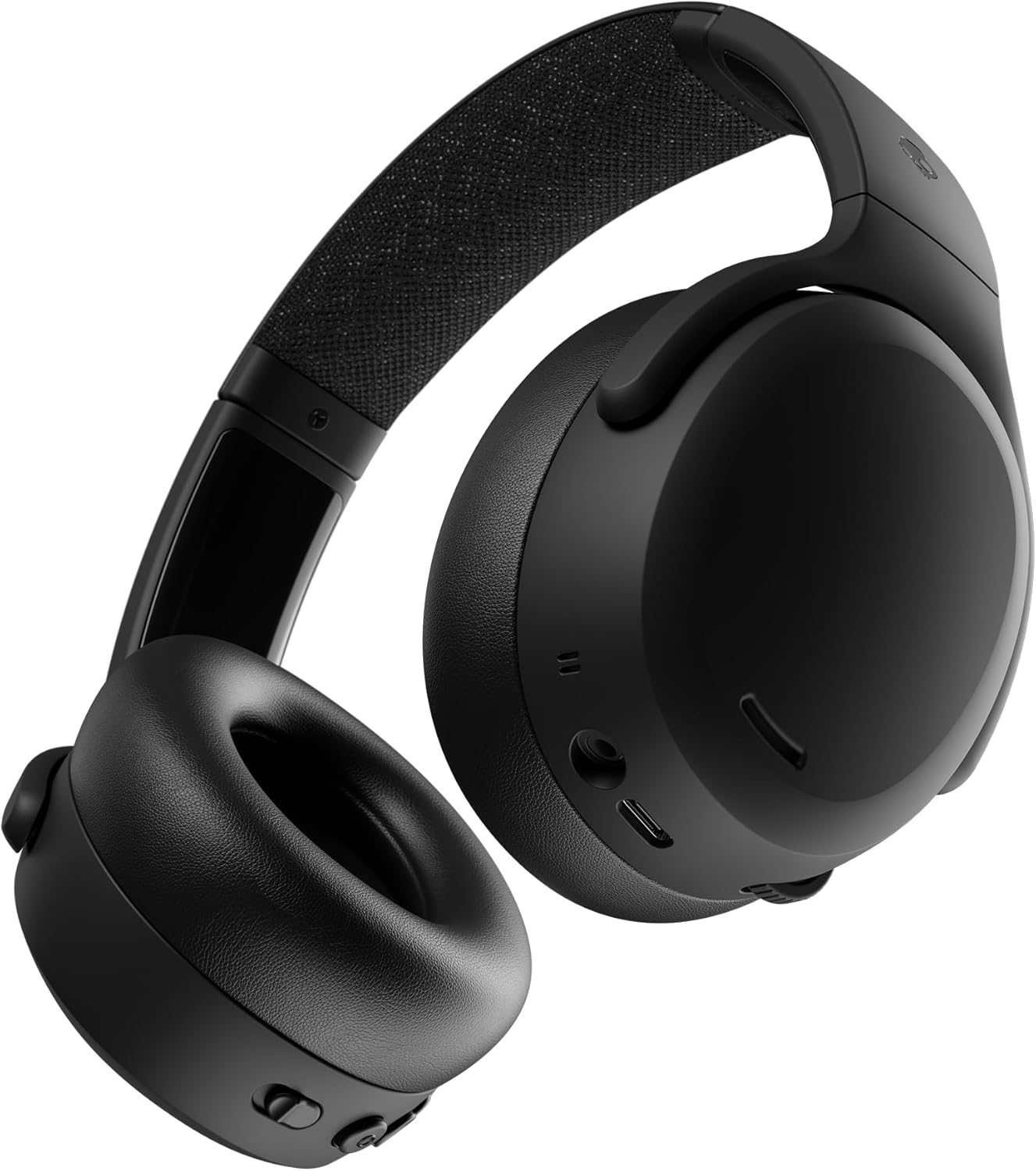
Skullcandy Crusher ANC 2 Wireless Headphones
Deep bass ANC headphones with 50-hour batteryOver-ear wireless headphones with adjustable sensory bass, active noise cancelling, and up to 60 hours of battery life. Perfect for focused work sessions, music, and immersive audio experiences.
Raycon Everyday — pocketable ANC
Active noise cancellation at a price where it’s usually absent rather than merely mediocre, 8 hours in the buds plus 24 in the case, and multiple tip sizes in the box — which is the difference between earbuds that stay in and earbuds you stop using.
Worth knowing: 4.3★ is the lowest rating of any audio product we carry, and across 30,629 ratings that average is well established rather than noise. Raycon is a marketing-led brand whose visibility comes largely from paid creator endorsements rather than measurement, so the review picture and the coverage picture disagree. And ANC at this price reduces steady low-frequency noise — a fan, a train — and does much less with voices, which is what most home offices actually contain.

Raycon Everyday Earbuds Classic
Affordable wireless earbuds for everyday useCompact and budget-friendly wireless earbuds with active noise cancelling, water resistance, and up to 32 hours of total battery life. A great option for daily use, work calls, and casual listening.
Setting it up
- Speakers go at ear height, angled at your head. This is why the G2000’s 10° tilt and the Pebble’s 45° elevation matter more than their wattage — a driver firing into your chest loses the treble before it reaches you. If yours don’t tilt, raise them.
- Leave space behind a rear-ported speaker. The G2000 and anything else with a port on the back needs clearance to work. Against a wall, the bass goes boomy and no EQ setting fixes it.
- Stereo means separated. Two speakers six inches apart under a monitor is a mono setup with extra steps. Put one either side of the screen, roughly as far apart as you are from them.
- Mute at the hardware, not in the app. A physical mute you can find without looking prevents the single most common call mistake. The JIAMQISHI’s indicator light and the Ozeino’s flip-up boom both make muted-and-talking visible rather than guessed.
- Test your microphone in the first week. Record a voice memo, then ask a colleague on a real call. The failure mode in these reviews is the mic dropping out, which you cannot hear from your side — and the return window is short.
What audio can’t fix
Audio is the one part of a desk setup that doesn’t touch your posture, which makes it easy to buy in isolation and easy to get wrong in company.
If you’re on calls all day, the keyboard picks matter more than you’d think — a mechanical keyboard eighteen inches from a desk mic is audible to everyone on the call, and it’s the reason that guide sorts on noise. The desk decides whether speakers have anywhere to sit, and a monitor arm frees the space a stereo pair needs by getting the monitor’s base off the desk.
That last one pairs specifically well: the desk space an arm gives back is roughly the space two speakers take.
Final recommendation
For a desk that plays out loud: the Edifier G2000. Real stereo separation, headroom at desk volume, three inputs, and the only speaker pair here without a reliability pattern in its review base. Give it clearance behind for the port.
For calls: the Razer BlackShark V2 X. Over-ear at 240g solves the comfort problem the cheap headsets here all share, and no battery means nothing to charge or pair. Accept that the mic, like every mic in this price range, wants testing early.
Cheapest way to be heard: the Logitech H390 at $21, with clear eyes about the durability numbers — twice as many owners report breakage as longevity.
No desk space at all: the Cyber Acoustics bar, as long as you’ve made peace with mono.
If you buy one thing: buy the headset. Speakers make your day nicer. A headset makes you understood, and that’s the one that shows up in other people’s opinion of your work.
Edifier G2000 RGB Bluetooth PC Speakers
Two full-range drivers and a rear port for genuine stereo separation, 16W RMS with headroom left at desk volume, three inputs so one pair serves a desktop, a laptop and a phone, and cabinets angled up 10° to aim the sound at your head.
Browse all home office gear picks →