Affiliate disclosure
As an Amazon Associate, InHomeGear earns from qualifying purchases. Clicking affiliate links may earn us a commission at no extra cost to you.A home office lamp has a harder job than a bedside one. It has to light a work surface evenly for eight hours without throwing a single reflection onto your monitor, without leaving the edges of your desk in shadow, and without taking up room you need for a keyboard.
Most lamps sold as “desk lamps” are reading lamps. They put a bright circle in one spot, which is fine for a book and wrong for a desk.
Here’s what separates the two, and how the nine lamps we’ve tested against that standard sort out.
The short answer
The BenQ ScreenBar is the best home office lamp for most people. It mounts on the monitor, so it uses no desk space at all, and its asymmetric lens is built to put light on the desk and none on the screen — the single hardest problem in office lighting, solved in hardware.
If you have a wide or dual-monitor desk, the Pzloz dual light bar covers more of it. If you want a good lamp for as little as possible, the BOHON gooseneck is the one.
Quick comparison
| Lamp | Mount | Best for | Price |
|---|---|---|---|
| BenQ ScreenBar | Monitor | Zero desk footprint, no screen glare | Mid |
| Pzloz Dual Light Bar | Clamp | Dual-monitor and wide desks | Budget |
| LitONES | Base | Remembers your settings; large/curved monitors | Mid |
| BOHON Gooseneck | Base | Precise aiming on a budget | Budget |
| Sailstar | Base | Wireless charging + CRI 95 colour | Budget |
| COZOO | Base | A real AC outlet in the base | Budget |
| Shinelife | Base | The basics, cheapest | Budget |
| Globe Electric Torchiere | Floor | Ambient room light + reading arm | Budget |
| Tyute RGB Corner | Floor | Accent light only — not task light | Budget |
What matters in an office lamp
Screen glare is the whole game
This is the difference between an office lamp and every other lamp, and it’s the one most buyers discover after the box is open.
A normal lamp radiates light in a cone. Put it beside a monitor and part of that cone lands on the panel, washing out contrast and adding a bright patch you unconsciously fight all day. You end up turning the lamp down until the desk is too dark, or pushing it so far to the side it stops lighting anything useful.
An asymmetric optical design — light thrown forward and down, cut off sharply above the horizontal — fixes this properly. The BenQ ScreenBar is built around it. With a conventional lamp you’re managing the problem by position: keep the head below the top of your screen and angled away from it.
Coverage, not brightness
A desk is roughly 120 cm wide. A single bulb over one end of it doesn’t light the other end, no matter how many lumens it claims.
What you want is a wide light source close to your work, not a bright one far from it. This is why light bars beat bulbs for desks: the Pzloz spreads 24W across two separate bars you aim independently, and a monitor bar spans the width of the screen by design. A gooseneck lamp with a small head can be excellent — it just has to sit close, which means it needs to not be in your way.
If the corners of your desk go dark when the room lights are off, the lamp is too small or too far, and no brightness setting will fix it.
Colour temperature across a working day
Cool light (5000–6500 K) reads as daylight and keeps you alert. Warm light (2700–3000 K) is what you want in the last hours of the day, especially if you finish after dark — bright cool light late suppresses melatonin and makes the transition out of work harder.
So a lamp with at least three colour temperature modes is not a luxury for a home office; it’s what lets one lamp work at 9am and at 8pm. Every lamp here except the entry-level Shinelife has a usable range. What separates them is whether you have to reset it every morning — the LitONES has a memory function that turns back on at your last brightness and colour, which sounds trivial until you’ve adjusted a lamp twice a day for a year.
Desk footprint
A weighted base is 15–20 cm of desk that stops being desk. On a small setup, that’s the difference between having room for a notebook and not.
Three ways out: a monitor mount (BenQ) uses none, a clamp (Pzloz) uses only the edge, and a tall base with a swing arm (LitONES) at least puts the light where the base isn’t. If you’re short on space and buying a base lamp anyway, make it one that earns its footprint — the Sailstar’s base is also a wireless charger and a pen holder, and the COZOO’s is a live AC outlet.
Colour accuracy, only if you need it
CRI measures how truthfully a light renders colour. Cheap LEDs sit around 80, which is fine for spreadsheets and misleading for anything visual.
If you edit photos, pick fabric or paint swatches, or check print proofs at your desk, the Sailstar’s CRI 95 is the only spec on this page that will change your work. If you don’t, it’s a number you can ignore.
Monitor-mounted
BenQ ScreenBar — best overall
Clips over the top of the monitor, no tools, no cables across the desk, and no base. The asymmetric lens throws light onto the desk and keeps it off the panel, which is the reason to buy this over a cheaper bar. An ambient sensor adjusts brightness as the room changes, with manual override on a touch dial.
Key features:
- Asymmetric optics — genuinely zero screen glare, not just “reduced”
- Ambient sensor plus motion sensor for auto on/off
- 2500–6500 K range, auto-dimming to match room light
- USB-C powered; fits curved and ultrawide bezels
- Occupies no desk space whatsoever
Worth knowing: it costs roughly twice what competing light bars do, and reviewers who compare directly say so — most still prefer BenQ’s finer brightness and colour control, but it is a real premium. With the motion sensor and auto-brightness both on, the light can briefly cycle on and off when it wakes; BenQ confirms that’s expected. Check your monitor’s bezel thickness before ordering.

BenQ ScreenBar Monitor Light
Best overallAn upgraded monitor-mounted LED light bar with USB-C power, motion sensor, and enhanced compatibility for ultrawide and curved monitors. Delivers uniform, glare-free lighting while keeping your desk clean and minimal.
Clamp-mounted
Pzloz Dual Light Bar — best for wide and dual-monitor desks
Two independently aimed 24W bars on a single clamp. Every other lamp here has one light source; this has two, which is what makes it the only option that covers a two-monitor desk evenly. Aim both across the desk, or one at the desk and one at the wall behind you for fill.
Key features:
- Two independently adjustable light bars, 24W total
- Clamps to the desk edge — no base, no desk space used
- 5 colour temperature modes, remote with timer and nightlight presets
- 4.7★ across 3,500+ reviews
- Made with recycled materials
Worth knowing: the remote is the weak part — one button cycles slowly through brightness levels, several reviewers report pairing trouble, and the batteries aren’t included. Budget a few minutes of setup annoyance for a lamp that’s otherwise the best coverage-per-dollar here.

Pzloz Dual Light Bar Desk Lamp
Best for dual monitorsA 24W LED clamp lamp with two independently adjustable light bars, 5 color temperature modes, and a wireless remote with timer and nightlight presets. Clamps to the back of your desk, so it takes zero desk space while covering a dual-monitor width.
Base-mounted desk lamps
LitONES — best base lamp
The most expensive lamp on this page and the one that behaves best day to day. Ten brightness levels dimmed smoothly, three colour temperatures, a timer, and a memory function that brings it back exactly where you left it. The metal arm is tall enough to reach over a large or curved monitor rather than fighting it.
Key features:
- Memory function — no resetting brightness and colour every morning
- 10 brightness levels, 3 colour temperatures, built-in timer
- Stays cool after hours of use, per reviewers
- Tall, flexible reach that clears big monitors
- Rated 4.8★
Worth knowing: the arm softens a little at full extension, and a few buyers wanted it stiffer at this price. No wireless charging, which some cheaper lamps include.

LitONES LED Desk Lamp with Memory & Timer
Best base lampA metal swing-arm LED desk lamp with 10 brightness levels, 3 color temperatures, a memory function that recalls your last setting, and a built-in timer. Tall and flexible enough to reach behind large or curved monitors without getting in the way.
BOHON Gooseneck — best budget lamp
A flexible gooseneck on a heavy base. That’s the whole product, and for a home office it’s the right whole product: you can put the light exactly where the work is, and the base is weighted enough that it stays there with the arm fully out. Three colour modes and adjustable dimming cover the working day.
Key features:
- Flexible gooseneck — aim precisely, not approximately
- Weighted base, stable at full extension
- 3 colour temperature modes with adjustable brightness
- USB charging port built in
- 4,300+ ratings at 4.5★
Worth knowing: the ambient light sensor shifts brightness on its own, and most reviewers who mention it end up switching it off and dimming by hand. Dimming is stepped click-stops rather than a smooth dial, and the top end isn’t especially bright.

BOHON LED Desk Lamp with Auto-Dimming
Best budget lampA gooseneck LED desk lamp with 3 color modes, adjustable dimming, a built-in USB charging port, and an ambient light sensor for auto-dimming. The flexible neck and heavy base make it easy to aim light exactly where you're working.
Sailstar — best if colour accuracy matters
CRI 95 at 800 lumens, with three colour temperatures and stepless dimming. The base is a 10W wireless charging pad and a pen holder, so the desk space it takes comes back as two other things you’d otherwise buy.
Key features:
- CRI 95 — colours read true, not just bright
- 800 lumens, stepless dimming, 3 colour modes
- 10W wireless charging pad in the base
- 360° flexible arm
- Pen holder built into the base
Worth knowing: the wireless charging is slow next to a dedicated pad — treat it as a place to set your phone down, not your main charger — and it gets unreliable through a thick case.

Sailstar LED Desk Lamp with Wireless Charging
All-in-one desk lamp with wireless charging and organizer built inAn LED desk lamp that doubles as a 10W wireless charging pad and pen holder, with CRI 95 color accuracy, 800 lumens, and three color temperature modes. Built for a desk that has no room for three separate gadgets.
COZOO — best if you’re short on outlets
The only lamp here with a real AC outlet in the base, not just USB. That matters more than it sounds in a home office: desk outlets are usually the constraint, and this puts a full-size socket plus two fast USB ports where you actually need them. Touch controls, three light colours, adjustable arm, pen holder.
Key features:
- Built-in AC outlet powers full-size devices — reviewers run label printers off it
- 2 fast-charging USB ports alongside the AC socket
- Touch controls, 3 light colours, adjustable arm
- Pen holder in the base
- 4.6★ across 1,090+ reviews, Amazon’s Choice
Worth knowing: reliability is the mixed note here — most reviews are strong, but a real minority report it failing after a period of use. Light spread is narrower than a full-size lamp, so it suits a compact desk better than a wide one.

COZOO LED Desk Lamp with AC Outlet & USB
Desk lamp that doubles as a real AC power outlet — not just USBAn adjustable LED desk lamp with a built-in AC wall outlet, two USB charging ports, and a pen holder. The AC outlet is the standout — it powers full-size devices, not just phones. Touch controls switch between 3 light colors.
Shinelife — cheapest that still works
Several brightness levels, multiple colour modes, a USB charging port, and a body small enough for a cramped desk. No memory, no wide coverage, basic build — but it dims, it changes colour temperature, and it costs very little, which puts it ahead of most lamps at this price.
Buy it for a secondary desk, a first setup, or as a stopgap. On a full-time work desk you’ll want more coverage within a year.
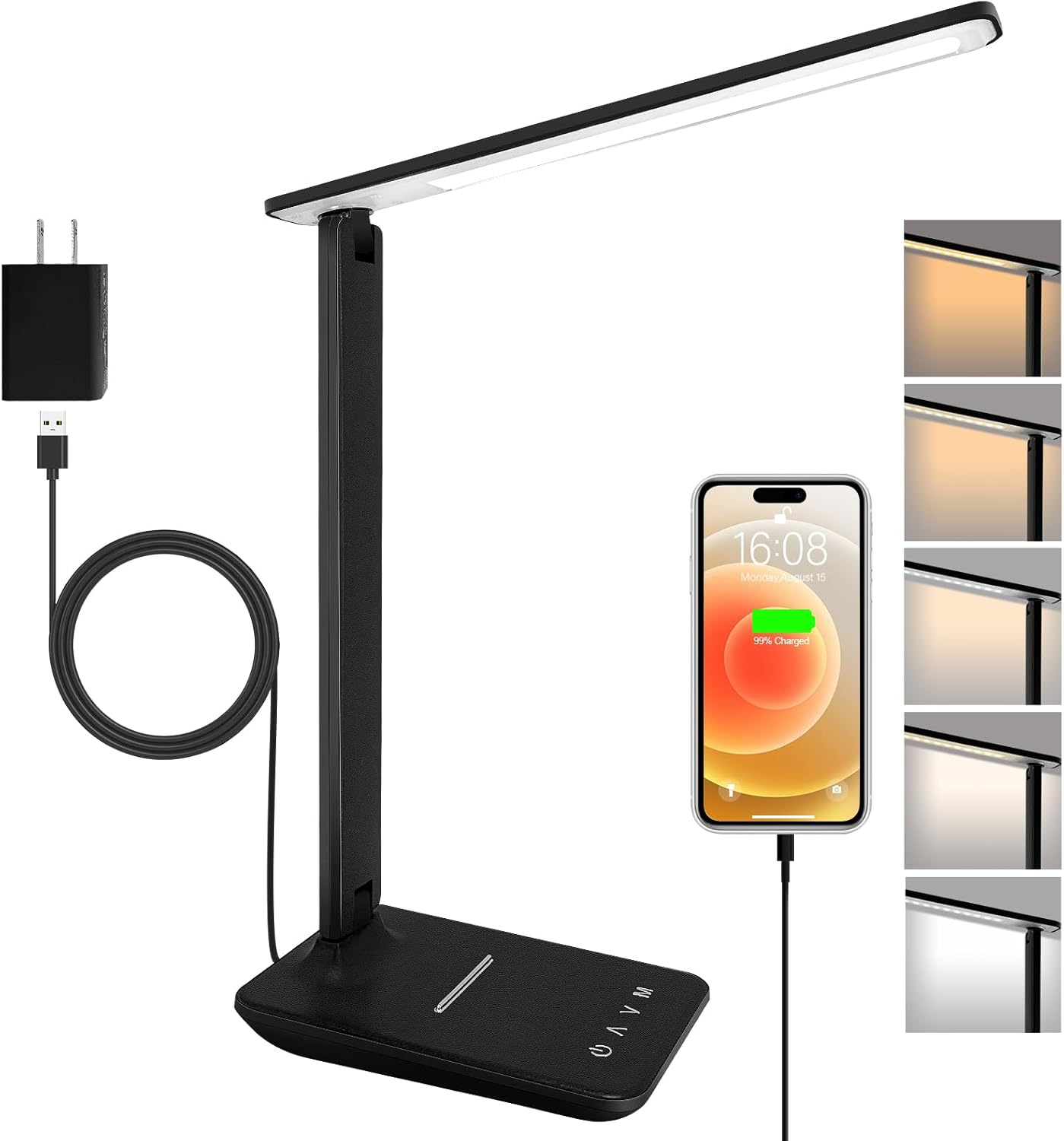
Shinelife LED Desk Lamp with USB Charging
Adjustable LED desk lamp with USB chargingA compact LED desk lamp with adjustable brightness levels, multiple lighting modes, and a built-in USB charging port. Ideal for home office setups, studying, and everyday desk use.
The second layer: don’t light only the desk
A bright desk in a dark room is the most common home office lighting mistake, and it’s a false economy. Your pupils adjust to the bright surface, then have to readjust every time you look away — at a second screen, at a person, at a notebook. That constant re-adjustment is a large part of what people call screen fatigue.
The fix is cheap: put some light on the walls and ceiling so the room isn’t a black surround. This is why a task lamp and a floor lamp are complements, not alternatives.
Globe Electric 72“ Torchiere — ambient plus a reading arm
Bounces light off the ceiling to fill the room, and carries a separately adjustable reading arm for close work. At 72 inches it lights a whole office corner while using no desk space at all, and the frosted shade keeps the output soft. Among the most-reviewed lamps we carry: 8,900+ ratings at 4.4★.
Worth knowing: multiple reviewers report the pole leaning or the base tipping, especially in a walkway. Assemble it carefully and keep it out of traffic. Assembly itself can be fussy — fine threads, occasionally misaligned parts.

Globe Electric 72" Torchiere with Reading Light
Best ambient layerA 72-inch torchiere floor lamp that bounces soft light off the ceiling for whole-room ambience, plus a separately adjustable reading-light arm for focused task lighting. A 3-step rotary switch controls brightness, and a frosted shade softens the output.
Tyute RGB Corner Lamp — accent light, and only that
Sixteen million colours, app and voice control, schedules, music sync. It makes a corner of the room look considerably better, including behind you on camera. It will not light your desk, and it isn’t sold as if it does.
Worth knowing: it’s lightweight and tips easily, particularly on carpet. Treat this as decor with a plug, bought after you already have a task lamp.

Tyute RGB Corner Floor Lamp with Music Sync
Ambient background lighting and color accents for a home office — not a task lightA corner floor lamp with 16 million app-controllable colors, music-reactive effects, and remote + voice control. Built for room ambience and looking good in the background on video calls, not for illuminating your desk surface.
Setting it up
The lamp matters less than where you put it. Four rules cover almost everything:
- Light comes from the side, not from behind you. A light source behind your head puts your own shadow on the desk and reflects off the screen. Side or slightly in front.
- Keep the head below the top of the monitor. If you can see the emitter from your seat, so can your screen. Monitor bars and clamp lamps sit above this line but aim down, which is why they get away with it.
- Match the lamp to the room, not to zero. Working with one bright lamp in a dark room is what causes the eye strain people blame on the screen. Ambient light first, task light on top.
- Go warm after sunset. Drop to 3000 K and one or two levels dimmer at the end of the day. If your lamp has a memory function, this is the one setting worth changing manually anyway.
What about video calls?
A desk lamp lights your desk. Lighting you is a different job, and a lamp does it only incidentally — the light is aimed down at a surface, not forward at a face.
Two of these do double duty. The BenQ ScreenBar sits above your monitor and throws light forward, which is a genuinely flattering angle. The Pzloz has a second bar you can turn toward yourself while the first stays on the desk.
If looking good on camera is the actual reason you’re shopping, a lamp is the wrong category — read the ring lights guide instead, and pair it with a decent camera from the webcam guide. Lighting and camera compound: an ordinary webcam in good light beats a great webcam in bad light every time.
Final recommendation
Most home offices: BenQ ScreenBar. It’s the only one that solves screen glare in hardware and costs zero desk space doing it. If you buy one lamp and never think about it again, buy this one.
Wide or dual-monitor desks: Pzloz dual light bar. Two aimable bars, no desk footprint, a fraction of the price.
Tight budget: BOHON gooseneck. Aim it where the work is, run it warm in the evening, and it will outperform anything else at the price.
Whatever you pick, add a floor lamp. The Globe Electric torchiere costs little and removes the dark-room problem that a desk lamp alone can’t touch.
BenQ ScreenBar Monitor Light
Asymmetric optics put light on the desk and none on the screen, it uses no desk space at all, and the ambient sensor keeps it matched to the room. The one lighting upgrade that changes how a home office feels to work in.
Browse all home office gear picks →